
Configure reserved numbers
Reserved numbers are never assigned to Teams users, even when they fall inside a defined phone number range.
To reserve numbers:
-
In the Teams Management portal, select Reserved Numbers.
-
Enter the numbers to hold back.
Configure a template to use a range
Once the ranges, bundles, and reservations are in place, configure the template to draw numbers from them.
To assign numbers from a range:
-
In the Teams Management portal, select Lifecycle Management Templates.
-
Select an existing template, or create a new one.
-
From the 'Assign Number from' drop-down list, select Number Range.
-
From the 'NumberRange' drop-down list, select the range or bundle.
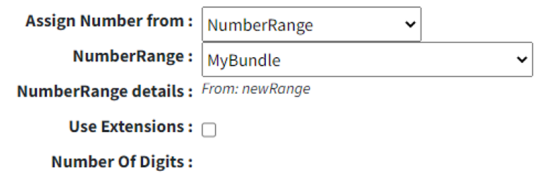
-
Click Submit All Changes.